036 security group
Control how traffic is allowed into EC2
- Inbound
- Outounb
Security groups
Acts as a firewall
They regulate
- Access to ports
- Authorised IP ranges (IPv4, v6)
- Control of In/Outbound network
Security groups Good to Know
Can be attached to multiple instances
Locked down to a region / VPC combination
Does live outside the EC2
It’s good to maintain dedicated security group for SSH
If your app is not accessible, that’s security group issue
If your app gives “connection refused” error, then …
All inbound traffic is blocked by default
All outbound traffic is authorised by default
Referencing other security groups
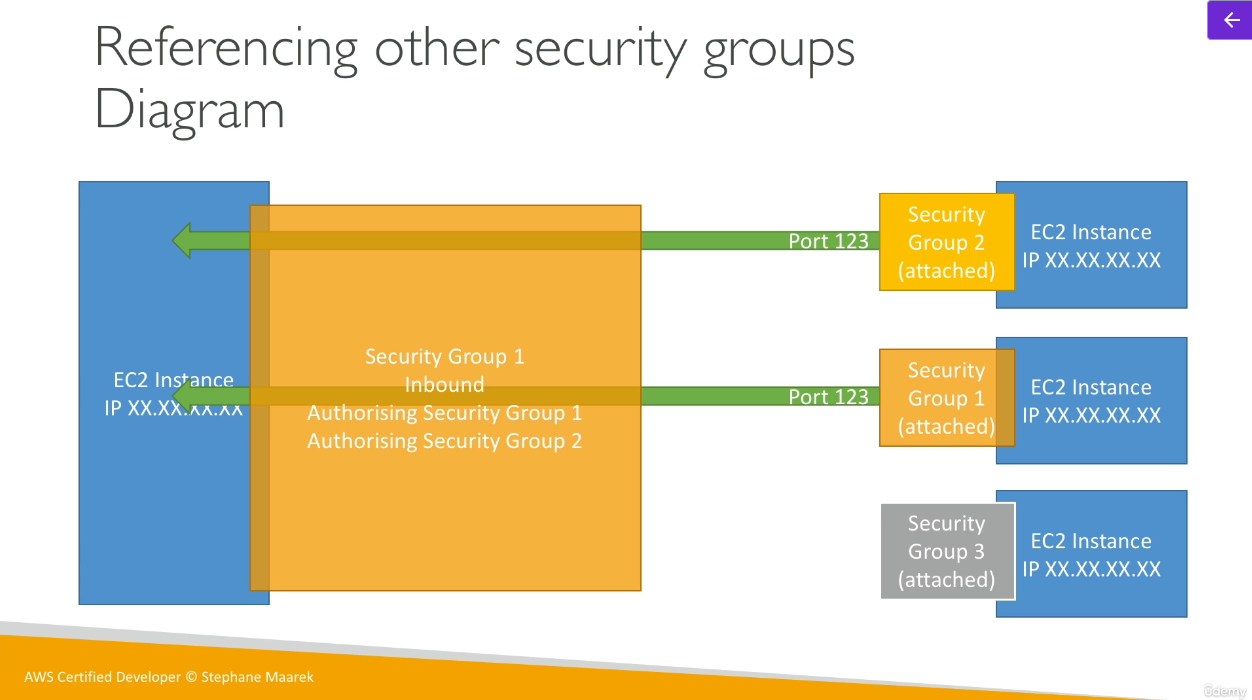 You can write rule on another security group.
Classic Ports to know
| Port | Target | Description |
|---|---|---|
| 22 | SSH (Secure shell) | log into a Linux instance |
| 21 | FTP (File Transfer Protocol) | upload files into a file share |
| 22 | SFTP (Secure File Transfrer Protocol) | upload files using SSH |
| 80 | HTTP | acess unsecured websites |
| 443 | HTTPS | access secured websites |
| 3389 | RDP (Remote Desktop Protocol) | log into a windows instance |